
Stocks
The Stocks widget will display stock data from different symbols. It uses Finnhub Dataopen in new window to get the data realtime.
For this widget you will need to create an external account. Please know that Finnhub Data API has a usage limit
Screenshot
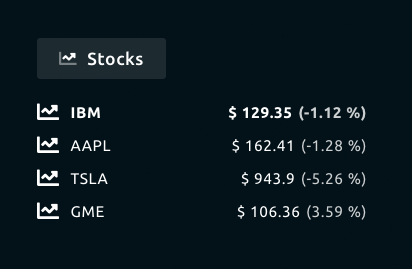
Functionality
- Show realtime stock data based on given symbols
- Shows 24 hours change in percentage.
How to use
Go to Finnhub Dataopen in new window and create an account.
After creating an account copy the "API Key".
Paste the API Key in the Stock widgets configuration options.
Provide the list with symbols you want see. You can comma separate multiple symbols. Example: IBM,AAPL,TSLA,GME.
Configuration
The following configuration options are available for this widget.
| Setting | Description |
|---|---|
| Widget Title | Widget header title |
| Symbols | Specify the symbols, you can specify multiple symbols by separating them with a comma. Example: IBM,AAPL,TSLA,GME. |
| Api Key | Specify the API Key from Finnhub Dataopen in new window. |
| Interval | Specify the interval in between the widget will poll for new data. |
All other configuration settings are explained here.